
Weebly Breadcrumb App – Add SEO Breadcrumb Navigation to Your Weebly Blog
The Weebly Breadcrumb app adds a breadcrumb trail to your Weebly blog pages, helping Google categorise your blog posts in search results and giving readers a clear path back to your blog overview. Drag it into your blog sidebar or header, enter your blog URL in the settings, and publish — no coding required. Customise font colour, text alignment, and the separator character from the settings panel.
Improves Blog SEO | Google BreadcrumbList Compatible | 3-Setting Customisation | Blog Pages Only | From codoplex.com
🗺️ Google BreadcrumbList SEO
🧭 Visual Blog Navigation
🎨 Colour, Alignment & Separator Settings
What Is the Weebly Breadcrumb App?
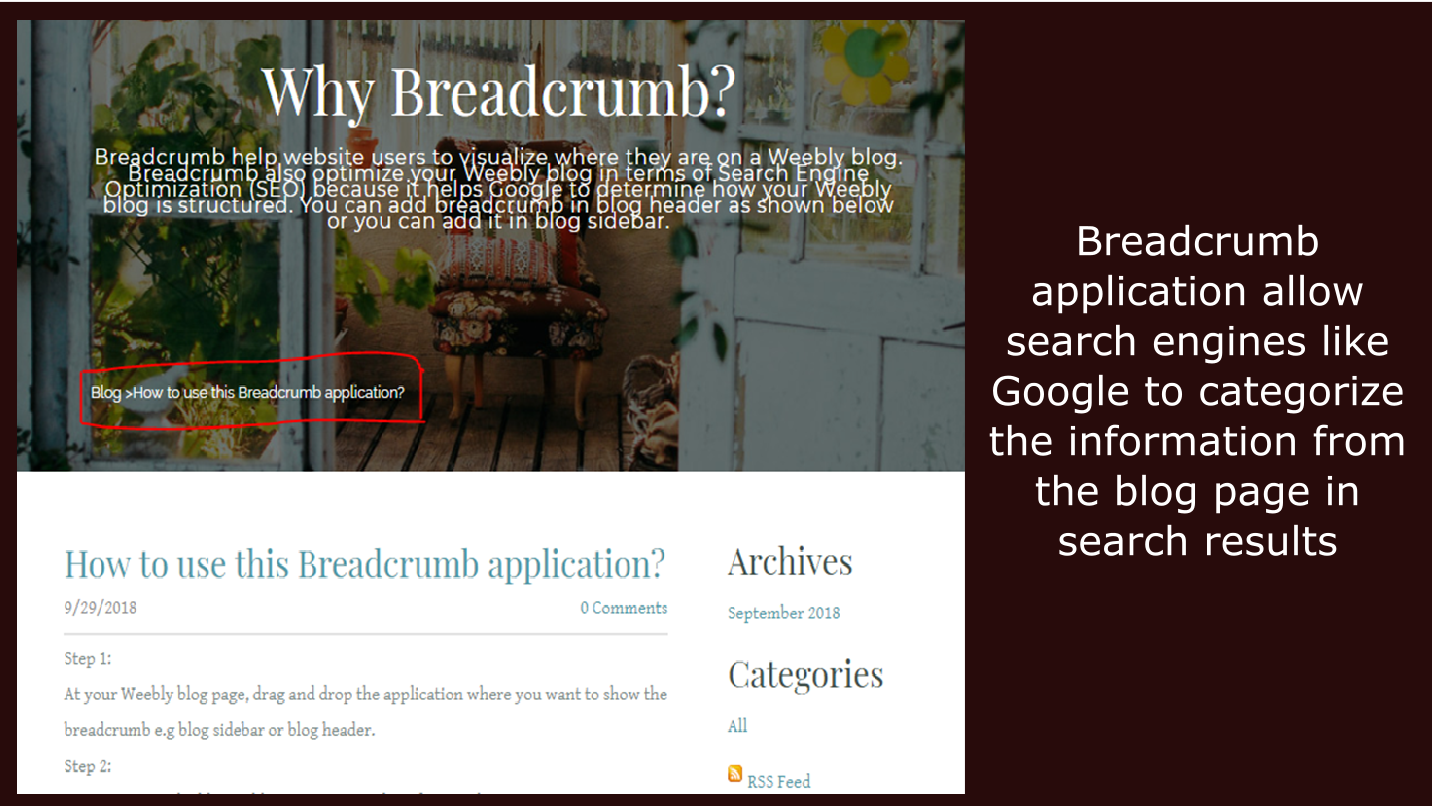
The Weebly Breadcrumb app adds a breadcrumb trail to your Weebly blog posts, showing a simple navigation path in the format Blog › Post Title. According to Google’s documentation, breadcrumbs allow search engines to categorise the information from a blog page in search results — making breadcrumb markup a recognised, low-effort on-page SEO improvement for blog-based websites.
Beyond SEO, the breadcrumb trail gives readers instant context about where they are on your site and provides a one-click path back to your main blog listing page. This reduces navigation friction, particularly for visitors who arrive directly on a blog post from search results and may not have seen your blog index page.
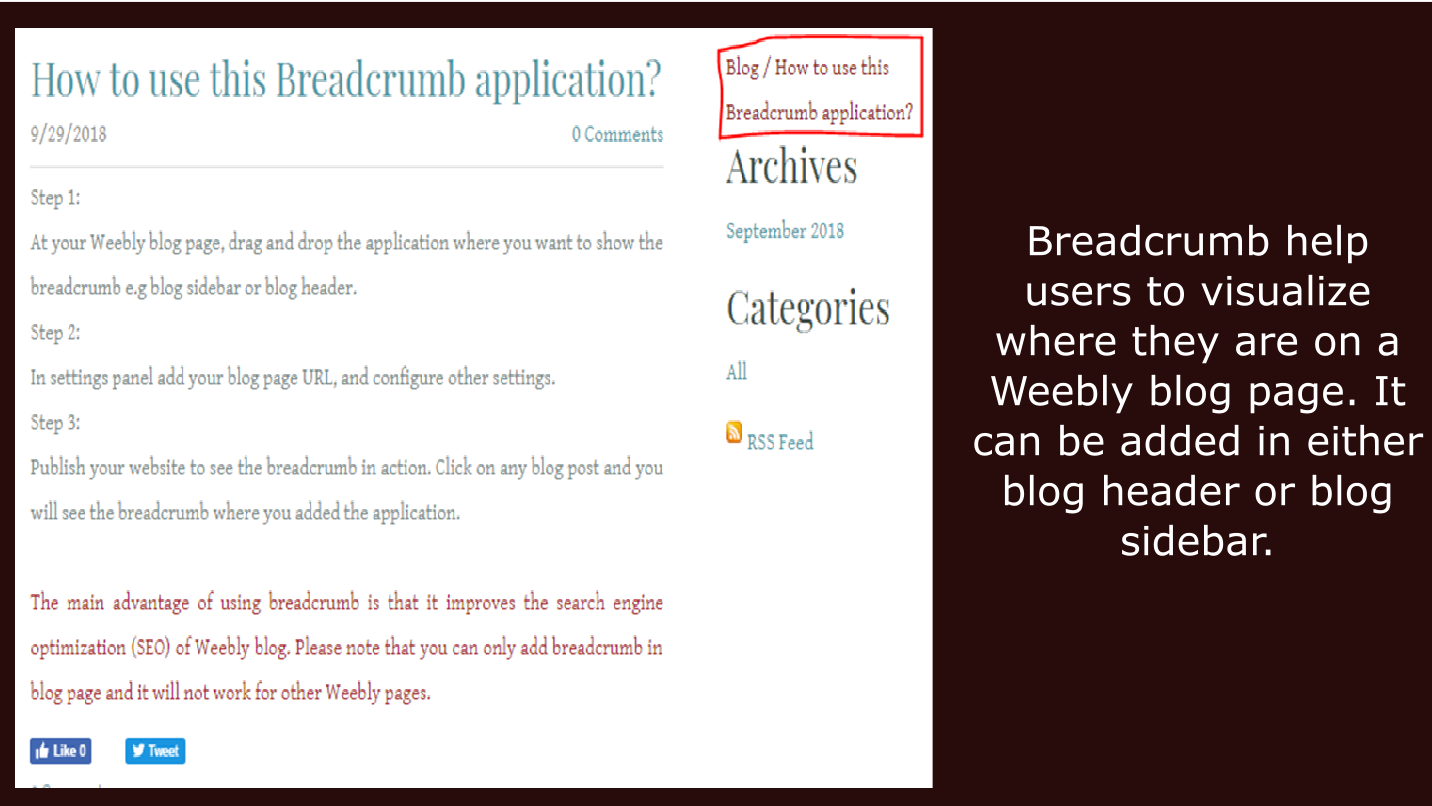
The app is placed using Weebly’s drag-and-drop editor — drop the widget into your blog page’s sidebar or header area, enter your blog URL in the settings panel, and configure font colour, text alignment, and separator character. Publish your site and the breadcrumb will appear on every individual blog post.
⚠️ Important: The Breadcrumb app works on Weebly blog pages only. It will not display a breadcrumb on standard Weebly pages (such as home, about, or contact pages). This is by design — see the FAQ below for details.
Screenshots
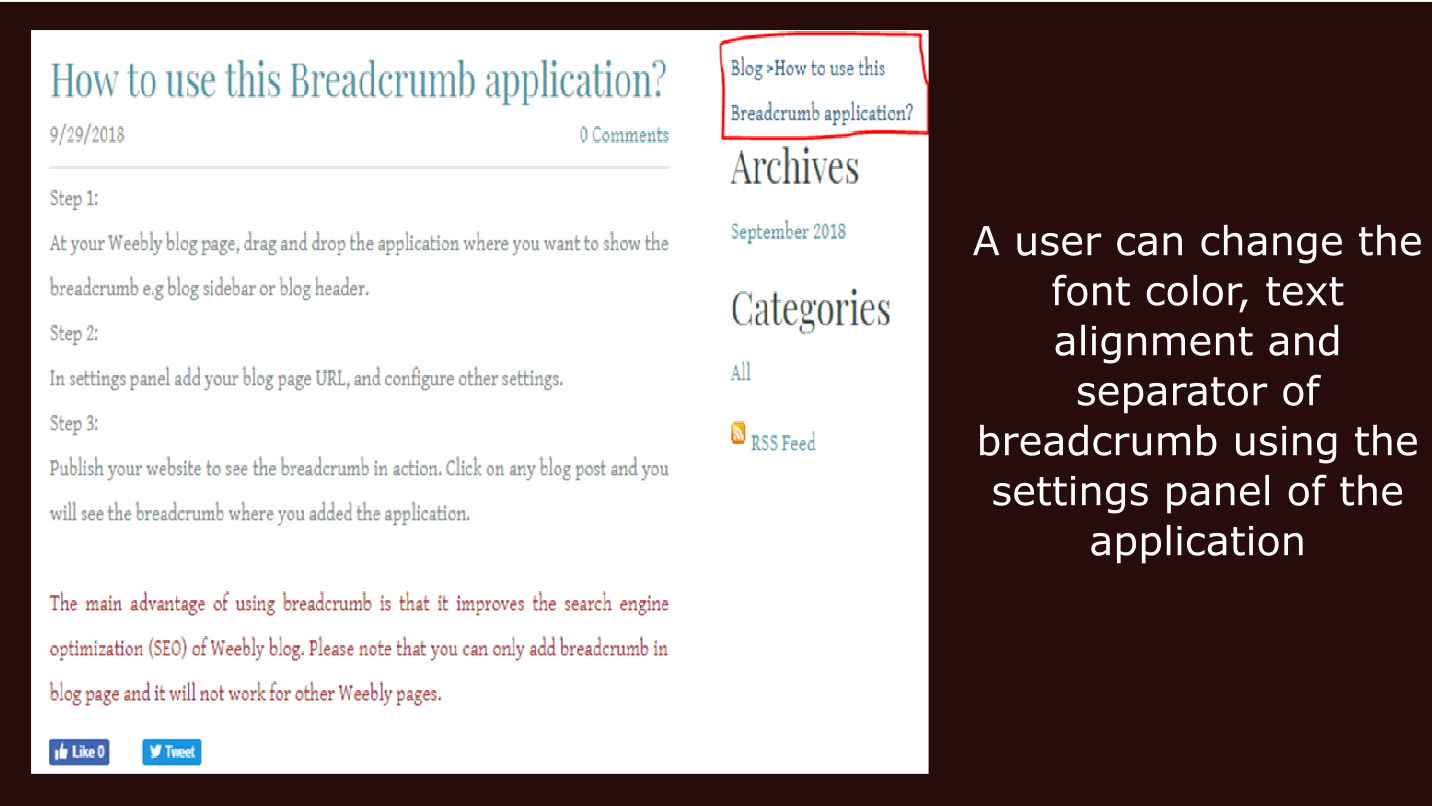
Breadcrumb on a Weebly blog post — placement, styling options, and the breadcrumb trail as it appears to visitors and in search results.
▶ Watch the demo video
Why Breadcrumbs Matter for Weebly Blog SEO
Google explicitly supports breadcrumb markup as a way for search engines to understand the structure of a website. When breadcrumb data is present, Google can display it in the search result snippet instead of (or alongside) the full URL — showing visitors a clear, readable path like Blog › Post Title directly in search results. This makes listings more informative and can improve click-through rates from organic search.
Weebly does not include breadcrumb navigation natively on blog pages. Blog posts also tend to receive a significant proportion of their traffic from organic search — visitors landing directly on a post without having visited the blog index. A breadcrumb trail solves both problems: it satisfies the structural signal that Google is looking for, and it gives direct-landing readers an immediate path to the rest of your blog.
The Breadcrumb app is categorised under SEO in the Weebly App Center, and its primary use case is exactly this: adding a low-friction breadcrumb trail to Weebly blog posts without requiring any custom code or theme modifications.
🗺️ What the Breadcrumb Shows
Blog › Your Post Title
- 🔤 “Blog” links back to your blog index page
- 📝 Post title links to the current blog post
- ➡️ Separator is customisable (default ›, can be changed)
- 🎨 Font colour is configurable in settings
- ↔️ Text alignment (left, centre, right) is configurable
- ⚠️ No blog category level (Weebly URL structure limitation)
How to Set Up Breadcrumb in Three Steps
No coding required. The entire setup is done inside the Weebly editor using drag-and-drop and the settings panel.
1
Place on Your Blog Page
Go to your Weebly blog page in the editor. Drag and drop the Breadcrumb widget from the apps panel into your blog sidebar or blog header — wherever you want the breadcrumb trail to appear on individual blog posts.
2
Configure the Settings Panel
Click the widget to open its settings panel. Enter your blog page URL (so the “Blog” link in the trail points to the correct page). Then set your preferred font colour, text alignment (left / centre / right), and separator character between the breadcrumb items.
3
Publish & Verify
Publish your website. Then click on any blog post on your live site to see the breadcrumb trail in place. Note that the breadcrumb renders on individual blog post pages — it does not appear on the main blog listing page itself. Allow time for Google to recrawl the page before the breadcrumb appears in search results.
Reviews
Breadcrumb has a 3.8★ aggregate rating from 5 reviews on the Weebly App Center. All 5 reviews are shown below in full, including one critical review and the developer’s response.
⭐⭐⭐⭐⭐
Weebly User Jun 24, 2021 · 5★
“This app is great. I like having the breadcrumb for SEO purposes, plus the user can quickly switch back to the blog overview. I messed up something on the install and the author quickly fixed it for me, so he provides excellent customer service too.”
💬 Developer (Jun 24, 2021): “Thanks for the feedback and appreciation.”
⭐⭐⭐⭐⭐
Larry Selleck Mar 4, 2019 · 5★
“I had a bit of a problem getting it going but support was right there. The app works as expected. Thanks.”
💬 Developer (Mar 8, 2019): “Thanks for the feedback and appreciation.”
⭐⭐⭐⭐
Lafcadio Adams Dec 31, 2018 · 4★
“This app shows “Blog” and then the title of your blog post as links. It’s a very simple breadcrumb for blog posts. I positioned it after other breadcrumbs that lead to my blog.”
ℹ️ Lafcadio stacked this breadcrumb after a separate breadcrumb widget that showed the path to the blog — using both together to create a deeper trail. This is a valid use case where the breadcrumb format (Blog › Post Title) is a deliberate design choice rather than a limitation.
⭐⭐⭐⭐
Erik Gagnon Nov 2, 2018 · 4★ (updated)
“Nice concept… However, unless I’m missing something, this app doesn’t include my blog category pages. It only lists: BLOG/ARTICLE_NAME — Category pages just come up as BLOG/ — Note: Didn’t realize this was a Weebly issue when I first wrote this. I’ve increased my rating accordingly.”
💬 Developer (Nov 3, 2018): “Yes, you are right. It’s like this because of Weebly’s default URL structure. Weebly doesn’t include category title in blog post URLs.”
ℹ️ Erik initially misattributed this to the app, then updated his review to 4★ once he confirmed it is a constraint of Weebly’s URL structure (which does not include category slugs in blog post URLs). The app displays the breadcrumb correctly given Weebly’s structure — it cannot include a category level that does not exist in the URL.
⭐
Weebly User Sep 3, 2019 · 1★
“Awful app. Total rip off. Poor functionality. Zero customization. Looks like a 12 year old coded it for beginning computer class.”
💬 Developer (Nov 8, 2019): “Can you please provide some specific information about the issues? so that we can give proper solution.”
ℹ️ This is the only 1★ review. The reviewer did not provide specific details about what went wrong, and did not respond to the developer’s request for more information. The developer offered to resolve any issue but received no follow-up. The claim of “zero customization” is inconsistent with the confirmed font colour, alignment, and separator settings. We recommend using the live demo and reviewing the implementation steps before purchasing to confirm the app meets your requirements.
Frequently Asked Questions
Does the Breadcrumb app work on all Weebly pages?
No. The Breadcrumb app is designed specifically for Weebly blog pages and will not function on standard Weebly pages such as your home page, about page, services page, or any other non-blog page. This is because the app reads the blog post URL structure and post title to generate the breadcrumb trail — data that only exists in the context of a Weebly blog post. If you need breadcrumb navigation on non-blog pages, this is not the right solution for that use case.
Why doesn’t the breadcrumb include my blog category?
Weebly’s default URL structure for blog posts does not include the category slug. A Weebly blog post URL follows the pattern yoursite.com/blog/post-title — the category is not part of the URL path. Since the app generates its breadcrumb trail from the URL, there is no category information available to display as an intermediate breadcrumb level. The result is a two-level trail: Blog › Post Title. This is confirmed by the developer and consistent with how Weebly handles blog URLs by default. A reviewer who initially complained about this updated their rating to 4★ once they confirmed it is a Weebly platform constraint, not an app limitation.
Where should I place the Breadcrumb widget on my blog page?
The app listing recommends placing the widget in the blog sidebar or blog header. Both locations are valid. Header placement makes the breadcrumb visible near the top of the post, where it functions most naturally as a navigation aid for visitors who landed directly from search. Sidebar placement is common if you want the trail visible throughout the post without it interrupting the content flow. In the Weebly blog editor, drag the widget from the apps panel into your preferred location. One reviewer noted they positioned it after another breadcrumb widget that showed the path leading to the blog, creating a combined trail — this is a valid configuration if your site structure includes intermediate pages before the blog.
Will the breadcrumb appear in Google Search results?
Google supports breadcrumb markup as a rich result type and may display the breadcrumb trail in search snippets instead of the full URL. This can make your search listings more readable and informative to potential visitors. However, whether Google actually shows the breadcrumb in results for a specific page is at Google’s discretion — it depends on factors including crawl frequency, page quality, and the overall site structure. Adding breadcrumb markup via this app is the correct technical step; it does not guarantee that breadcrumbs will appear in every search result immediately. After publishing with the app installed, wait for Google to recrawl your blog posts before checking for breadcrumb-enhanced results in Search Console.
What customisation options are available?
The settings panel provides three customisation options: font colour (change the text and link colour to match your site’s colour scheme), text alignment (left, centre, or right), and separator character (the symbol displayed between breadcrumb items — for example ›, /, or –). These cover the core visual adjustments needed to integrate the breadcrumb into most site designs. The breadcrumb is intentionally lightweight; its primary function is structural SEO and navigation clarity rather than decorative styling. If you need extensive visual customisation beyond these three settings, check the live demo first to confirm the default appearance is acceptable for your site.
Explore Our Other Weebly Apps
Give Google the Breadcrumb Signal Your Blog Is Missing.
Weebly doesn’t add breadcrumb navigation to blog pages natively. The Breadcrumb app fixes that in three steps: drop the widget, enter your blog URL, publish. Your blog posts gain a clean Blog › Post Title trail that satisfies Google’s BreadcrumbList markup recommendation and gives readers a direct path back to your blog overview. It’s one of the simplest structural SEO improvements you can make to a Weebly blog.